
Download Aynite Download Manager for Windows 10 and 11
Aynite Download Manager (ADM) for Windows is one 64-bit installer for Windows 10 and 11 with everything inside: the download engine, the video tool, the torrent engine and the browser add-on for Chrome, Edge, Brave and Firefox. Free to use with a single in-app ad; a licence removes it. No toolbars, no bundled extras.
Updated 15 October 2026. Applies to Aynite Download Manager 1.7.0.
Which file do I need?
There is one Windows installer, ADM-Setup-<version>.exe, for 64-bit Windows 10 and Windows 11. The version number and size are on the button above, and the file's SHA-256 fingerprint is listed under Verify this file on the download section of the home page, so you can check that what you got is untouched.
The installer puts the program in your own user account's Programs folder, so no administrator password is needed. If you prefer an installation for every user of the PC, the installer offers that choice and then asks for the password.
Windows 7, 8 and 32-bit Windows are not supported.

Install in three steps
Run the installer
Double-click ADM-Setup-<version>.exe. If Windows shows "Windows protected your PC", that is the SmartScreen notice every new installer gets until it has a reputation; what it means and how to check the file before you click More info, then Run anyway.
Choose the options
Tick the desktop shortcut and Start with Windows if you want them. ADM starts minimized to the tray when it starts with Windows, so it is there when you hover a video or send a link from the browser.
Add the browser add-on
On its first start ADM lists the browsers it found and opens the right page in each one. This is what puts the Download button on videos and lets ADM catch browser downloads. How the add-on works.
What you get on Windows
- Up to 32 connections per file, with pause and resume that survive a restart of the program or the PC (what happens when a download fails).
- A Download button on every video in your browser, with the quality list up to 4K and audio-only MP3 or M4A. How to download a YouTube video in 4K.
- Live stream recording from the moment you press Start until you press Stop, saved as a normal MP4.
- Torrents and magnet links in the same queue as everything else, with seeding that stops when you say so.
- A scheduler that starts the queue at night, stops it in the morning and can shut down, sleep or hibernate the PC when the queue is done.
- The Grabber, which lists every link, picture, video and document on a page so you can tick what you want.
- Checks on every finished file: a scan with Windows Security's command-line scanner, and the SHA-256 and MD5 fingerprints shown in the completion window. How to verify a download.
- Files sorted into Videos, Music, Documents, Programs, Compressed, Images and Torrents inside Downloads\ADM; pick other folders in Options.
- Drag links onto the window, press Alt+Shift+D to add one from anywhere, or turn on the clipboard watch in Options so that a copied link opens ADM by itself.
- FTP and SFTP with saved logins, HTTP and SOCKS5 proxies, and speed limits for one download or for all of them.
Your first download
Copy any link. ADM notices it and opens the Add Download window with the link already filled in; press Start. Or hover a video in your browser and click Download this video, then pick a quality.
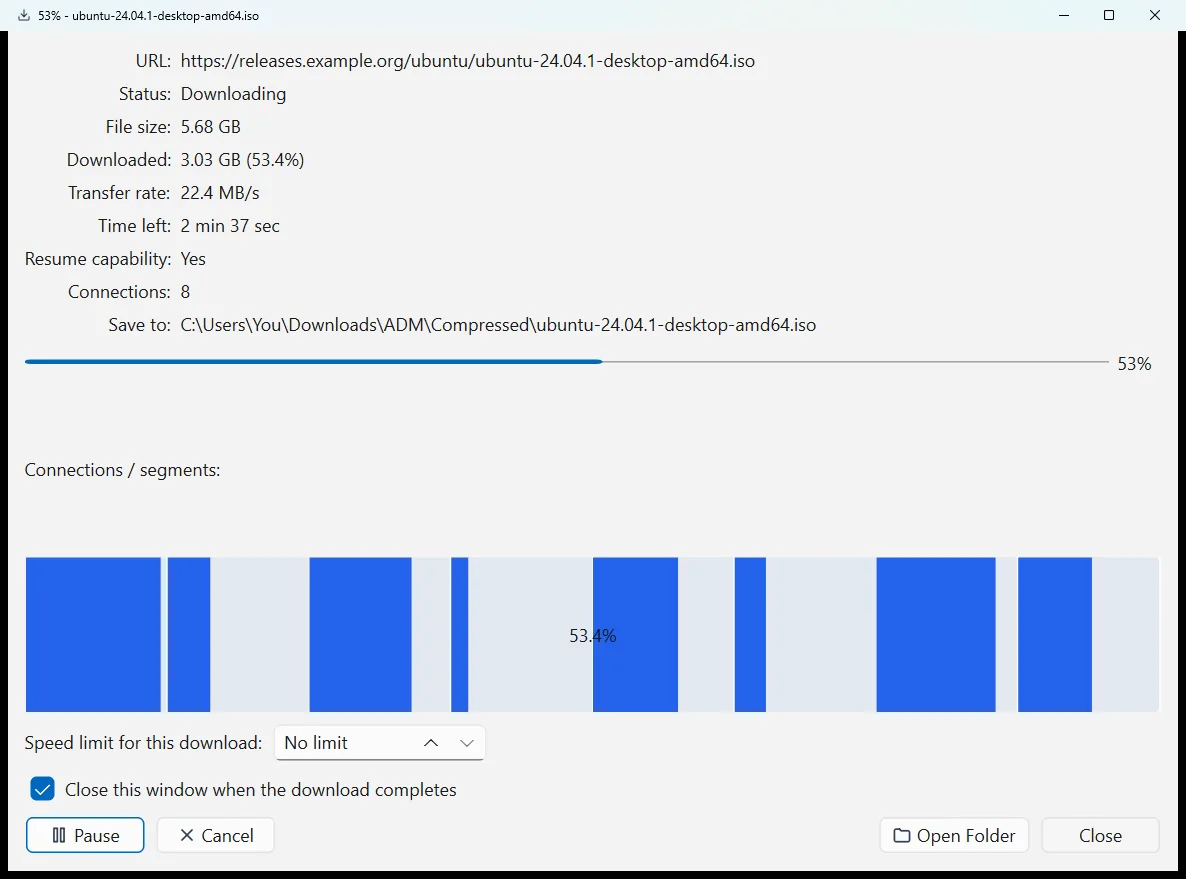
The progress window shows every connection at work, the speed, the time left and a speed limit for just this download. When the file is finished, a Download complete window opens with Open, Open folder and Copy SHA-256 buttons.
How it compares on Windows
The three programs people weigh against each other on Windows, on the points that decide the choice. The full tables are on the IDM comparison and the IDM alternatives round-up.
| Aynite Download Manager | Internet Download Manager | Free Download Manager | |
|---|---|---|---|
| Price | Free with one in-app ad; a licence removes it | Paid after a 30-day trial | Free |
| Also on Linux | Yes | No | Yes |
| Quality list on the video, up to 4K | Yes | Video panel; qualities depend on the site | Video download; qualities depend on the site |
| Torrents and magnet links | Yes | No | Yes |
| Live stream recording | Yes | No | No |
Competitor facts as their websites presented them in October 2026.
Updates
ADM checks for a new version when it starts and every few hours while it runs. When one is out, a banner above the download list offers Download and install: the program closes, the installer runs silently, and the new version starts by itself. Downloads that were running continue.
Fixes for video sites come with these updates, which matters because video sites change often; Tools, then Check for Updates looks for one right away. What to do when YouTube downloads stop working.
Free version and licence
Aynite Download Manager (ADM) is free to download and use, with every feature and no limits. The free version shows a single ad inside the program; a licence from AyniteSoft removes it. There are no toolbars and no bundled extras in the installer. Current prices and licence options are on aynitesoft.com.
Other platforms
The same program runs on Linux: a package for Ubuntu, Linux Mint and Debian, and an archive for Fedora, Arch and other distributions. There is no Mac version yet.
Questions
Does ADM run on Windows 7 or Windows 8?
No. Aynite Download Manager needs 64-bit Windows 10 or Windows 11.
Does it need administrator rights?
No. By default the installer puts the program in your user account's Programs folder and never asks for a password. An installation for all users is offered as an option.
Is there a portable version?
Not at the moment. ADM has to be installed; the installer is about 110 MB and installs in under a minute.
Can ADM take over downloads from Chrome or Edge?
Yes. Once the add-on is installed and its Take over browser downloads option is on, downloads you start in the browser open in ADM instead, with several connections and pause and resume.
Where are my downloads?
In Downloads\ADM, sorted into Videos, Music, Documents, Programs, Compressed, Images and Torrents. Change the main folder, or the folder for one category, under Options.
How do I uninstall it?
Through Windows Settings, Apps, like any other program. Your downloads stay where they are; the settings and the download list live in your AppData folder and are removed with the program.
Get ADM
One installer with everything included. Install it, add the browser add-on when asked, and every link you copy or every video you hover is ready to download.
For Windows 10 and 11, Ubuntu, Linux Mint, Debian and other Linux distributions
Verify this file
The Windows installer's fingerprint (SHA-256), for anyone who wants to check the download is untouched:
0b419e24880befe63ef221cf18ad3130dfcaac854884c6de5b13af85854922cb