
Check a download with its SHA-256 in Aynite Download Manager
Many sites publish a fingerprint next to a file: an SHA-256, SHA-1 or MD5 that is unique to that exact file. Paste it into Aynite Download Manager when you add the download and ADM verifies the finished file against it. Every finished file also shows its own fingerprints, so you can check one later or compare it with a friend's.
Updated 14 October 2026. Applies to Aynite Download Manager 1.7.0.
Verify a download against the published fingerprint
Copy the fingerprint from the site
Sites show it near the download link, as SHA-256 (64 characters), SHA-1 (40) or MD5 (32).
Paste it into Add Download
The Add Download window has an optional checksum box. ADM recognises the kind from its length.
Read the result
When the download finishes, the completion window says whether the file matches. A mismatch opens the window as Download finished with a problem: the file is damaged or not the one the site described. Delete it and download again.
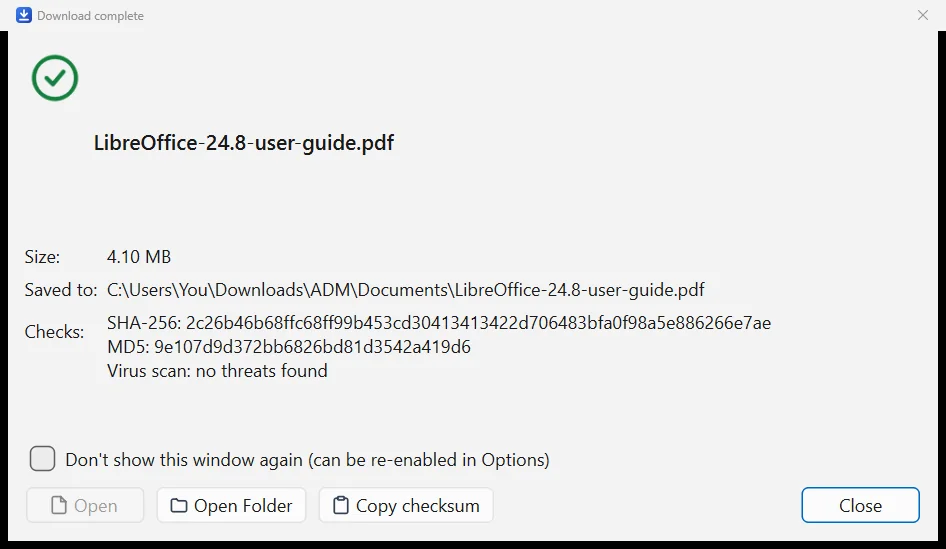
Every finished file shows its fingerprints
Even without a published value, the completion window lists the SHA-256 and MD5 of every finished file, with a Copy SHA-256 button. Use it to compare a file with a copy elsewhere, to publish a fingerprint for something you share, or to check a file against a value you find later. The scan with your system's security software appears in the same window.
Why a fingerprint matters
A fingerprint changes completely if a single byte of the file changes, so a match proves the file arrived whole and is exactly what the publisher described. It is the same check the download section of this site offers for the ADM installer itself. If you do not want the fingerprints computed, switch them off under Options, After a download completes.
Questions
Which checksums does ADM understand?
SHA-256, SHA-1 and MD5, recognised by their length.
Does checking slow the download down?
No. The fingerprint is computed after the download, in the background, and takes a second or two per gigabyte on a modern PC.
Can I verify a file I downloaded earlier?
Open its completion window again from the list (double-click a finished download) to see its fingerprints, and compare them with the published value by eye or with the Copy SHA-256 button.
What if the site publishes no fingerprint?
Then there is nothing to compare against; the fingerprints ADM shows still let you compare copies of the file with each other.
Get ADM
One installer with everything included. Install it, add the browser add-on when asked, and every link you copy or every video you hover is ready to download.
For Windows 10 and 11, Ubuntu, Linux Mint, Debian and other Linux distributions
Verify this file
The Windows installer's fingerprint (SHA-256), for anyone who wants to check the download is untouched:
0b419e24880befe63ef221cf18ad3130dfcaac854884c6de5b13af85854922cb