
How to download YouTube videos in 4K, 1080p or as MP3 with Aynite Download Manager
With Aynite Download Manager (ADM), saving a video takes one click on the player and one pick from the quality list. This guide shows the steps on Windows and Linux, how to keep only the sound, how to handle playlists and live streams, and what cannot be downloaded. Without the add-on, paste the video's address into Add URL and pick the quality the same way. ADM is free to use, supported by one in-app ad a licence removes; when YouTube changes, the fix comes with ADM's next update, installed silently.
The quality list, on the video itself
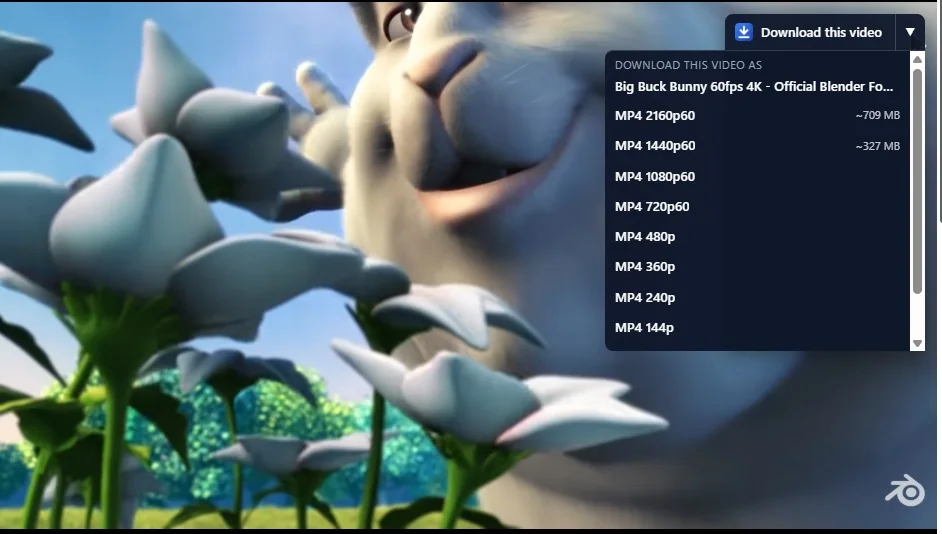
Hover any YouTube video with the ADM add-on installed and the Download button appears. Its arrow opens the list of qualities the site offers for that video, from 4K at 60 frames per second down to 144p, plus audio-only MP3 and M4A. Pick one; ADM downloads picture and sound and joins them into a single MP4.
Step by step
Install ADM and its browser add-on
Run the installer and let ADM set up the add-on for your browser when it asks. This takes a minute and is needed only once.
Open the video and hover it
Move the mouse over the player. A small Download this video button appears in its corner. Click the arrow next to it to see the quality list.
Pick the quality
The list shows every quality the site offers for that video, for example MP4 2160p60 (4K), 1440p, 1080p, 720p, down to 144p. Pick one and the download starts in ADM. The sound is included; ADM joins picture and sound for you.
Or keep just the sound
Choose Audio only MP3 or Audio only M4A from the same list for music, talks and podcasts.
Find the file
Finished videos land in the Videos folder inside your Downloads folder, under ADM; music goes to Music. The completion window has an Open and an Open folder button.
Playlists, channels and live streams
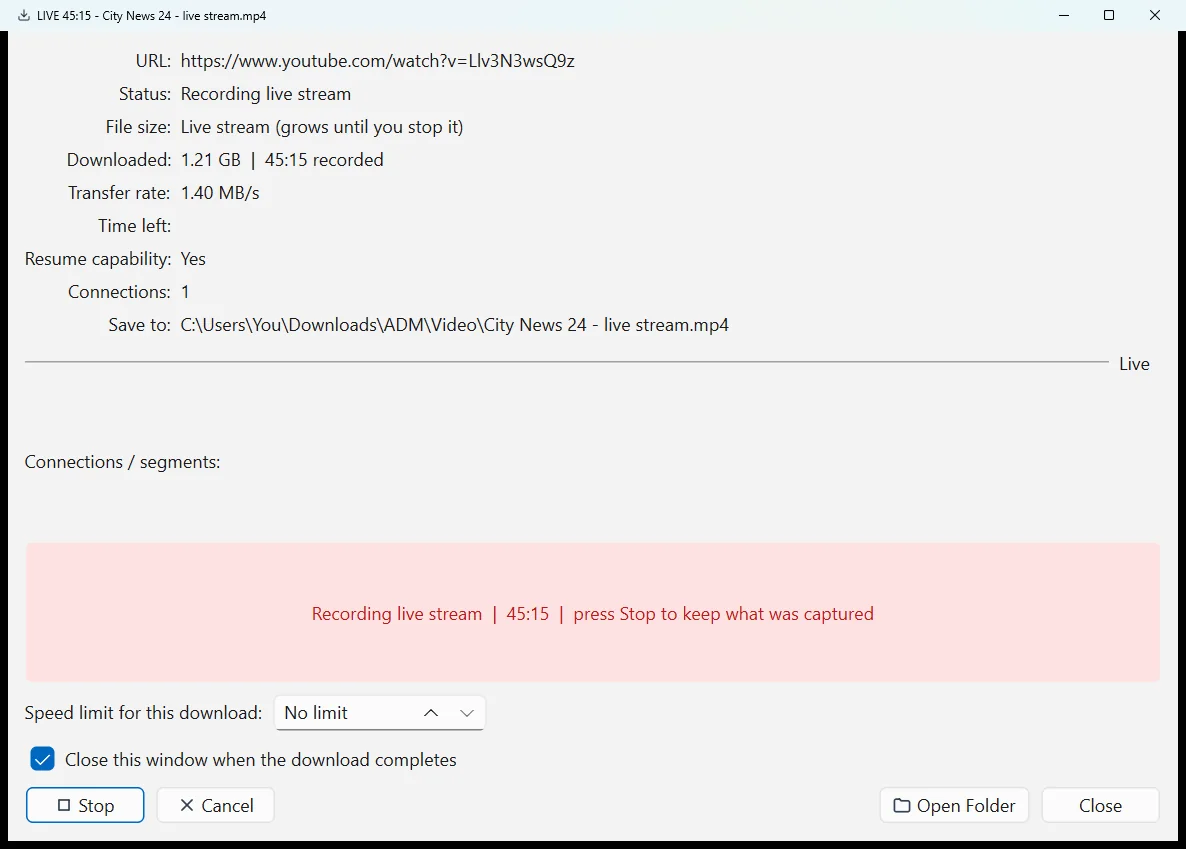
For a playlist, paste its address into ADM or open the Grabber on the page: every video is listed with its title, you tick the ones you want, and they download in turn at the quality you chose. Live broadcasts are recorded with a Stop button and saved as a normal video file, with the time and size shown while it records.
Get ADM
One installer with everything included. Install it, add the browser add-on when asked, and every link you copy or every video you hover is ready to download.
For Windows 10 and 11, Ubuntu, Linux Mint, Debian and other Linux distributions
Verify this file
The Windows installer's fingerprint (SHA-256), for anyone who wants to check the download is untouched:
0b419e24880befe63ef221cf18ad3130dfcaac854884c6de5b13af85854922cb
Questions
Which qualities can I get?
Whatever the site offers for that video. On YouTube that is often 4K (2160p) at 60 frames per second, 1440p, 1080p, 720p, 480p, 360p, 240p and 144p. ADM lists them all, with the file size when the site provides it.
Why is 4K missing on some videos?
Because the video was not uploaded in 4K. The list shows only what exists for that video.
Can I download a whole playlist or channel?
Yes. Paste the playlist address into ADM, or use the Grabber, and tick the videos you want. They queue up and download one after another.
Can I record a live stream?
Yes. Hover the live video and click Download this video. ADM records from that moment until you press Stop or the broadcast ends, and saves a normal MP4.
Does it work for videos that need me to be signed in?
Yes. Use the Download button in the browser while you are signed in to the site; ADM uses that sign-in for the download. Pasting the link into the program by hand does not carry the sign-in.
YouTube downloads stopped working. What now?
Video sites change often. Open the Tools menu in ADM and choose Check for Updates; if a new version is offered, it installs silently in place and brings the site fix. Step by step.
Does it work on other sites?
Yes, on over 1,800 sites, including Vimeo, Dailymotion, Twitter/X, TikTok, Facebook, Twitch, SoundCloud and many news sites. Netflix, Prime Video, Disney+ and other subscription services encrypt their videos, and ADM does not try to get around that.
Is downloading YouTube videos allowed?
Download only what you have the right to save: your own uploads, videos the creator allows you to download, and material released under a licence that permits it. Respect each site's terms and your local law. ADM is a tool; what you download with it is your responsibility.