By AyniteSoftWindows and Linux

Download faster. Save any video. Windows and Linux.

Aynite Download Manager (ADM) is a download manager and video downloader for Windows and Linux, made by AyniteSoft. It speeds up downloads with several connections at once, saves videos from YouTube and over 1,800 sites in the quality you choose, records live streams, handles torrents, and resumes on its own when the connection drops.

For Windows 10 and 11 and Linux (Ubuntu, Mint, Debian and others)

Free to use, with one in-app ad. Also for Linux. Buy a licence to remove ads

Download faster and more reliably

ADM fetches several parts of a file at the same time, so big downloads usually arrive much faster than in a browser. Pause a download and continue it later, even after a restart. If the connection drops, ADM waits for the server and picks up where it left off on its own.

ADM main window with a list of downloads, progress bars and speeds

Watch every connection at work

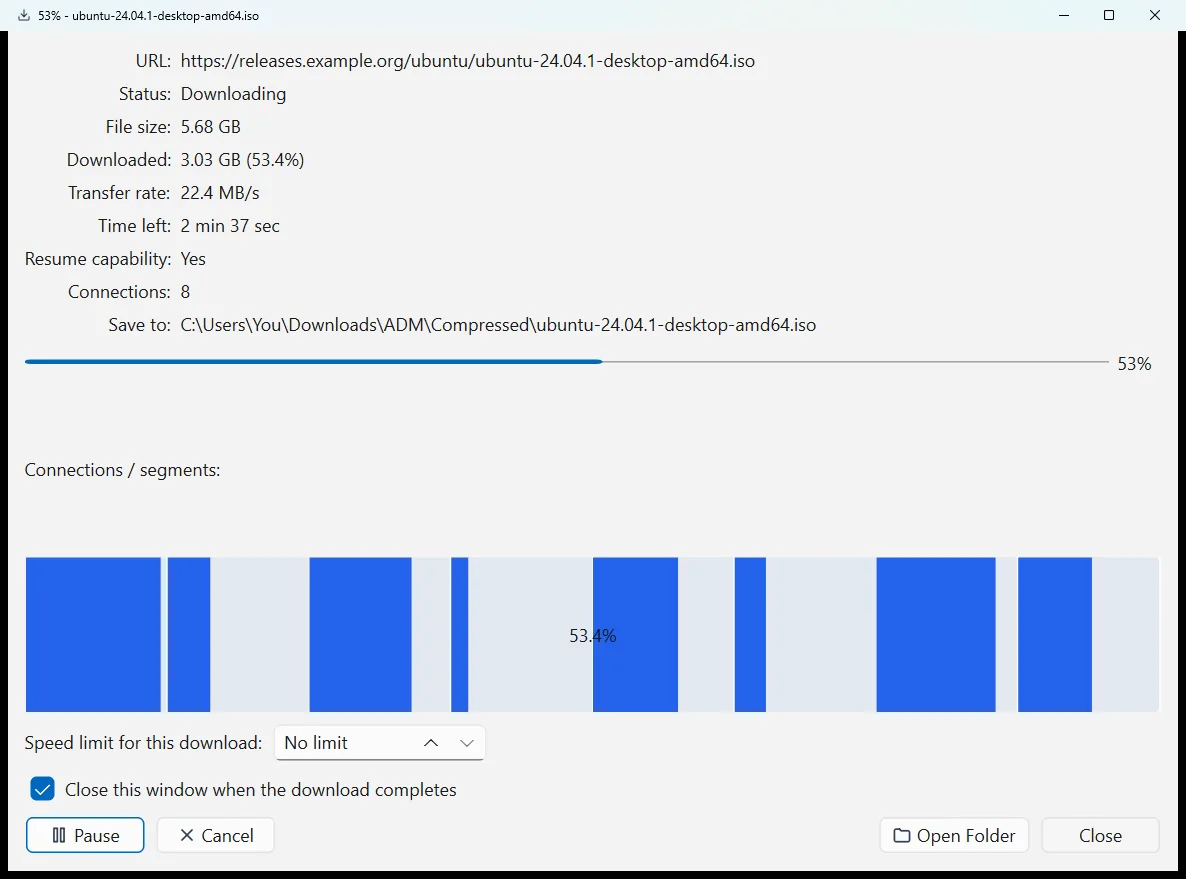
The progress window shows each connection and the piece of the file it is working on. Set a speed limit for one download while the others run at full speed, and open the finished file or its folder with one click.

Progress window showing eight connections downloading parts of one file

A Download button on every video

With the browser add-on, a small Download button appears on any video you hover, on YouTube and over 1,800 sites. Pick the quality you want, up to 4K where the site offers it, or keep just the sound as MP3, and the video is saved to your computer.

How to save a YouTube video in 4K or as MP3

The ADM Download button over a YouTube video with a list of qualities

Record live broadcasts

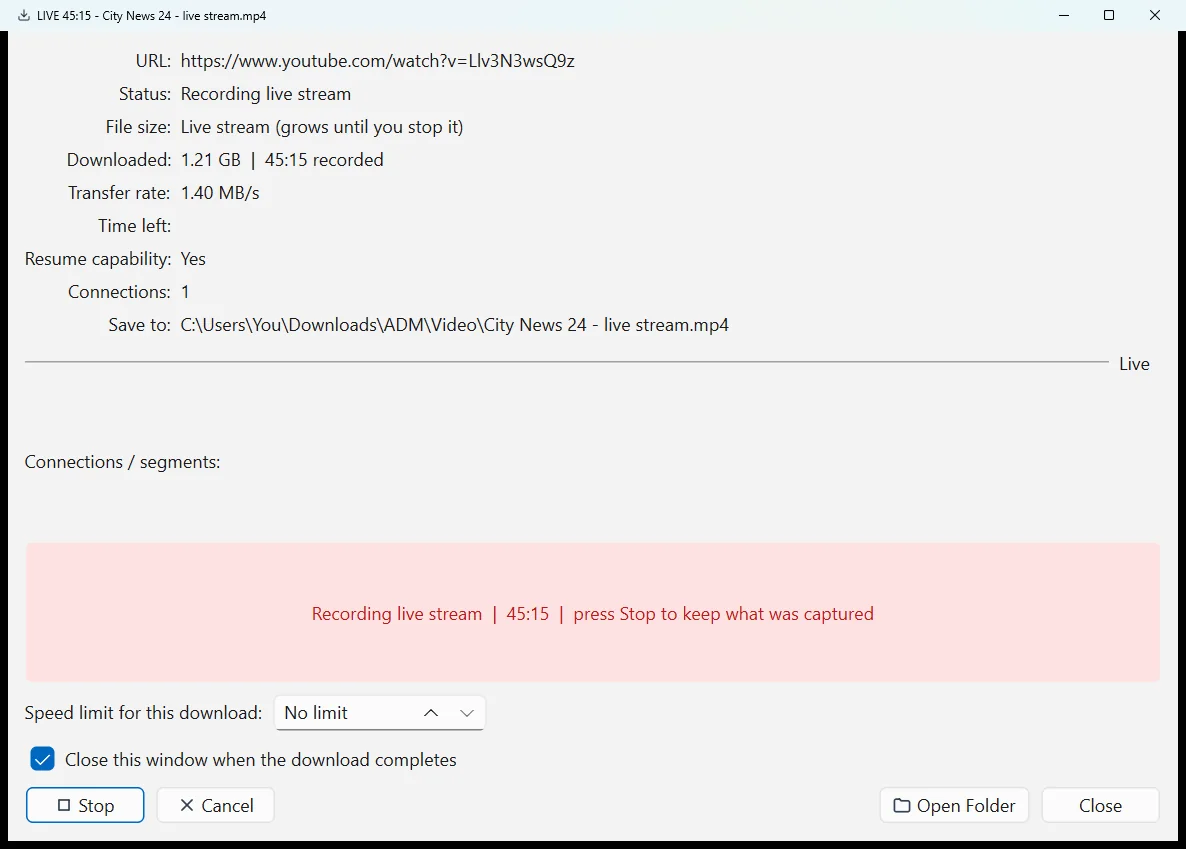
Live streams are recorded from the moment you press Start until you press Stop or the broadcast ends. The window shows the time and size captured so far, and a dropped connection is reconnected automatically.

Progress window recording a live stream with a Stop button

All popular browsers are supported

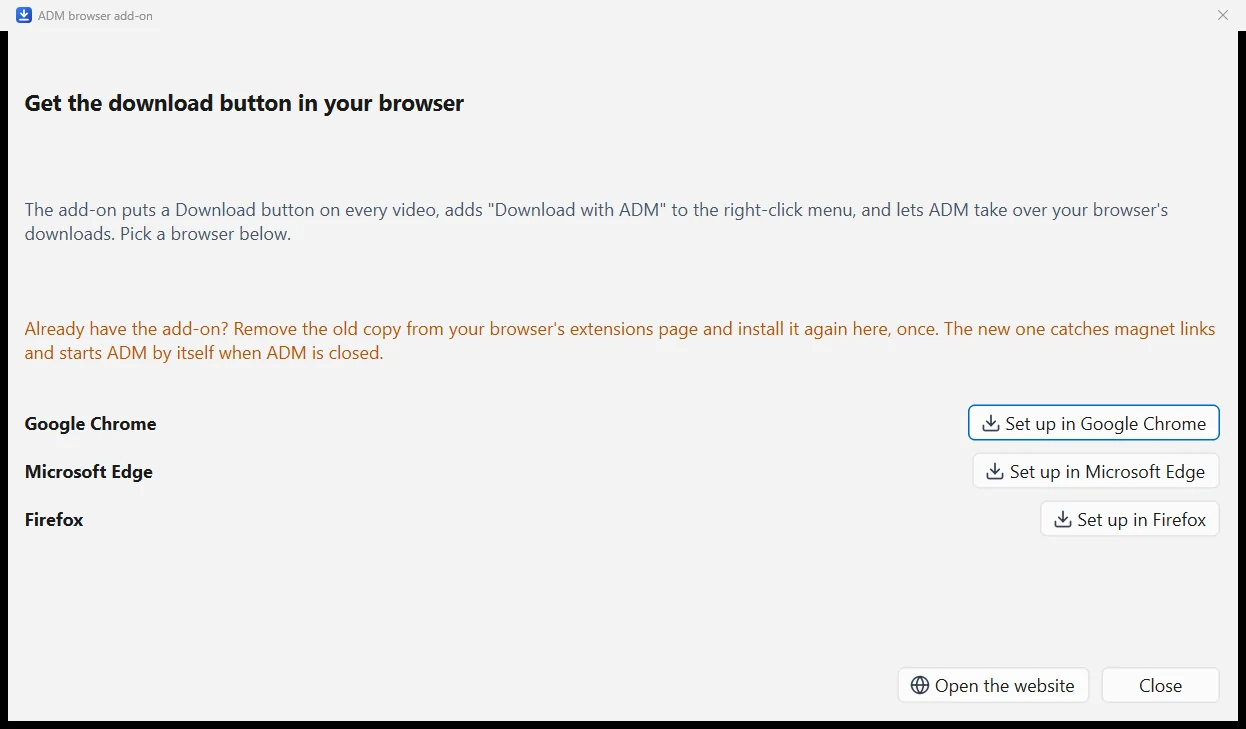
The add-on works in Google Chrome, Microsoft Edge, Brave and Firefox. It adds Download with ADM to the right-click menu and can take over the browser's normal downloads so they finish faster.

The window in ADM that sets up the add-on for each installed browser

Grab a whole page at once

Point the Grabber at a page and it lists every file, picture, video and link on it, sorted by type and size. Tick what you want and download it all in one go, or hand it every video of a playlist.

The Grabber window listing the files found on a web page

Download on a schedule

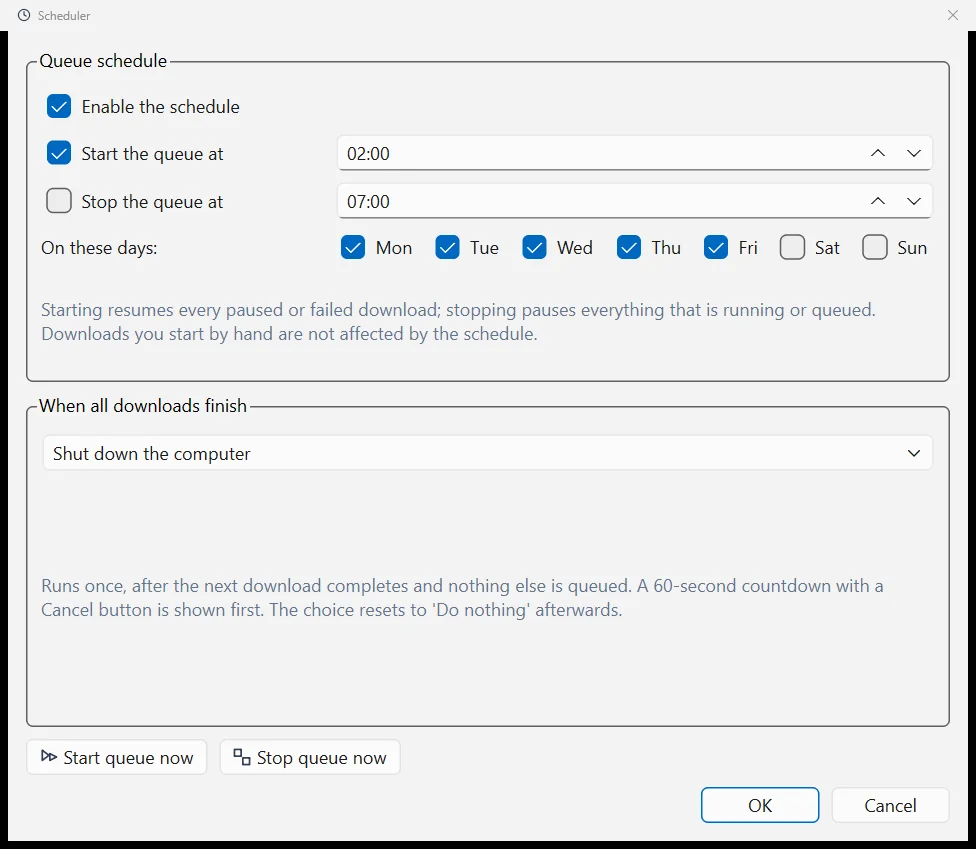
Start the queue at night when the line is free and stop it in the morning, on the days you choose. When everything has finished, ADM can shut the computer down or put it to sleep.

Scheduler window with start and stop times and days of the week

Torrents and magnet links too

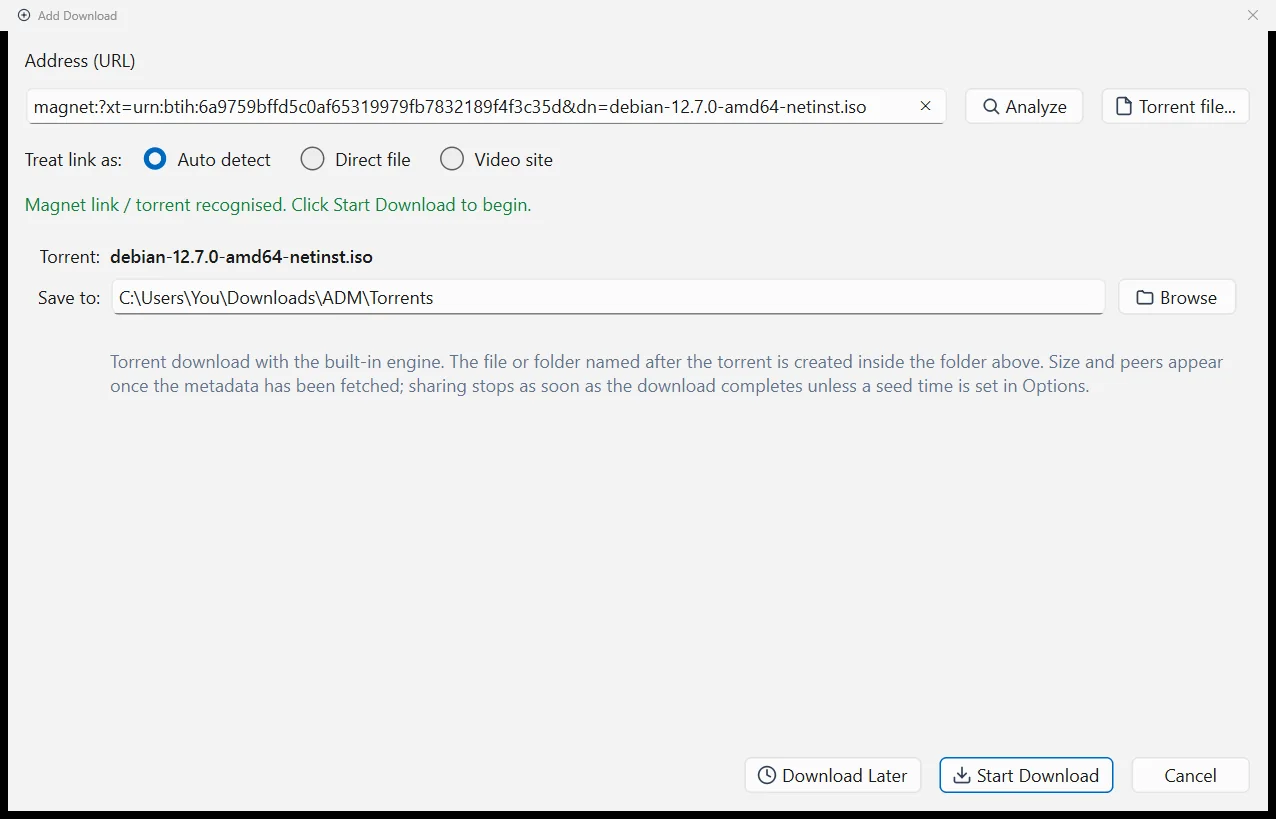
Open a magnet link or a torrent file and ADM downloads it alongside everything else, shows how many people are sharing it, and stops sharing when it is done unless you want otherwise.

Add Download window with a magnet link ready to start

Checked when it finishes

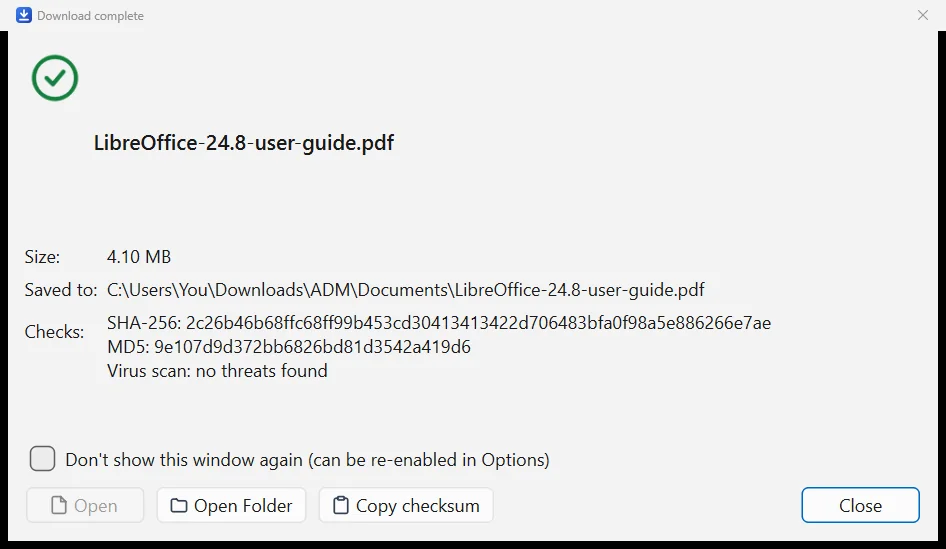
Every finished file can be scanned for viruses with the security software of your system and checked for damage. Files are sorted into folders for videos, music, documents, programs and pictures, and nothing you already have is silently overwritten.

Download complete window showing the scan result

Get ADM

One installer with everything included. Install it, add the browser add-on when asked, and every link you copy or every video you hover is ready to download.

For Windows 10 and 11, Ubuntu, Linux Mint, Debian and other Linux distributions

Verify this file

The Windows installer's fingerprint (SHA-256), for anyone who wants to check the download is untouched:

0b419e24880befe63ef221cf18ad3130dfcaac854884c6de5b13af85854922cb

New version

ADM 1.7.0

  • Linux versions: a package for Ubuntu, Linux Mint and Debian, and an archive for other distributions.
  • Live broadcasts can be recorded, with a Stop button and live size and time.
  • The program tells you about new versions and installs them silently, in place.
  • The browser add-on says when a video is protected instead of staying silent.

Released . Installed copies are told about it automatically.

Download the new version

Safe to install

  • Free to use, no bundled extrasFree with a single in-app ad; a licence removes it. The installer contains ADM and nothing else — no toolbars, no adware.
  • Every download can be verifiedThe installer's fingerprint is published here, and the built-in updater checks it before installing.
  • Your files stay yoursNothing about your downloads leaves your computer.
  • Updates itselfNew versions install silently in place with one click, and each one brings the latest video-site fixes.
  • Windows and LinuxWindows 10 and 11, Ubuntu, Linux Mint, Debian and others.
  • Made by AyniteSoftBuilt and supported by one company, with a privacy policy you can read.

What users say

ADM is new, and only real words from real users go here. Using it? Tell us what works and what should be better, and with your permission your review appears on this page.

Share your experience

Everything ADM does

  • Several connections per file
  • Pause and resume, even after a restart
  • Automatic resume after connection drops
  • Videos from YouTube and over 1,800 sites
  • Choose the quality, up to 4K, or audio only (MP3, M4A)
  • Live stream recording
  • Download button on every video
  • Right-click: Download with ADM
  • Takes over browser downloads
  • Sign-in-required videos via the add-on
  • Google Drive, Dropbox and OneDrive links
  • Whole pages and playlists at once
  • Torrents and magnet links
  • FTP and SFTP, with saved logins
  • Proxy support
  • Scheduler with shutdown when done
  • Speed limits, global and per download
  • Duplicate link detection
  • Virus scan and damage check on completion
  • Sorted into category folders
  • Clipboard watching: copy a link, it pops up
  • Updates itself, silently and in place
  • Windows 10 and 11
  • Linux: Ubuntu, Mint, Debian and others

Browser add-on

The add-on puts the Download button on videos, adds "Download with ADM" to the right-click menu, and lets ADM take over the browser's normal downloads. ADM offers to set it up the first time it starts; you can also do it from here.

Chrome, Edge or Brave

Download the add-on
  1. Unzip the download into a folder you will keep, for example inside Documents.
  2. In your browser open the menu, choose Extensions, then Manage extensions.
  3. Turn on the Developer mode switch in the corner of that page.
  4. Click Load unpacked and choose the folder from step 1.
  5. Pin the ADM icon next to the address bar. It shows "Connected" while ADM is running.

Tip: in ADM, choose Tools, then Install Browser Add-on, and it opens the right page and folder for you.

Firefox

Download the add-on
  1. Open Firefox's Add-ons and themes page from the menu.
  2. Click the gear icon, choose Install Add-on From File, and pick the downloaded file.
Firefox says the add-on could not be verified

Regular Firefox installs add-ons only from Firefox's own add-on site. Until Mozilla has signed the add-on, the Developer Edition and ESR editions of Firefox can install it after you switch on unverified add-ons in their settings.

How to install

  1. Download the installer

    Click Download for Windows above. One file, about 109 MB, with everything included. On Linux, take the package for your distribution instead.

  2. Run it

    Open the downloaded file. If Windows shows "Windows protected your PC", click More info, then Run anyway. No administrator password is needed. On Linux, double-click the package to install it, or unpack the archive and run the Install script inside the folder it creates.

  3. Add the browser add-on

    When ADM starts for the first time it lists your browsers and sets the add-on up with a click. This is what makes the Download button appear on videos.

  4. Download something

    Copy any link and ADM opens by itself, ready to go. Or hover a video in your browser and click Download this video. Finished files land in the ADM folder inside Downloads.

  5. Keep it up to date

    ADM tells you when a new version is out and installs it from the Tools menu, silently and in place. Each new version brings the latest video-site fixes.

Guides and comparisons

Questions

Windows says "Windows protected your PC". Is it safe?

Yes, when the file came from this page. Windows shows that screen for new programs that are not yet signed with a certificate it recognises, so the publisher reads Unknown publisher for now. Compare the file's SHA-256 with the one under Verify this file, then click More info and Run anyway. What the notice means.

Is Aynite Download Manager an alternative to IDM?

Yes. Aynite Download Manager (ADM) and Internet Download Manager (IDM) both speed up downloads with several connections, resume broken downloads and add a Download button to the browser. ADM also runs on Linux, records live streams, downloads torrents and magnet links, and lists video qualities up to 4K. Feature by feature, or see the round-up of IDM alternatives.

YouTube downloads stopped working. What now?

Video sites change often. Open the Tools menu in ADM and choose Check for Updates; if a new version is offered, it installs silently in place and brings the site fix. Step by step.

Can it download videos that need me to be signed in?

Yes. Use the Download button that the browser add-on shows on the video while you are signed in to the site, and ADM uses that sign-in.

Why is there no Download button on Netflix, Prime Video or Disney+?

Those services encrypt their videos (DRM) and the browser only decrypts them inside a locked player. No download manager can save them, and getting around that protection is against the law in most countries, so ADM does not try. The add-on tells you when a video is protected instead of leaving you guessing.

Does it catch downloads from other programs, not just the browser?

Downloads started inside other programs cannot be taken over by any download manager. Instead, press Alt+Shift+D and paste the link, drag it onto the ADM window, or turn on the clipboard watch in Options so that a copied link opens ADM by itself.

Where do my files go?

In an ADM folder inside your Downloads folder, neatly sorted into Videos, Music, Documents, Programs and so on. You can pick any other folder in Options.

Does Aynite Download Manager run on Linux?

Yes. Aynite Download Manager (ADM) runs natively on Linux: a .deb for Ubuntu 22.04+, Linux Mint 21+ and Debian 12+, and an archive for Fedora, openSUSE, Arch and other distributions. The browser add-on works as on Windows. There is no macOS version yet. ADM for Linux, with pages for Ubuntu, Linux Mint, Debian and Fedora and Arch.

Is Aynite Download Manager free?

Yes. Aynite Download Manager (ADM) is free to download and use, supported by a single ad shown inside the program. A licence from AyniteSoft removes that ad; there are no toolbars or bundled extras in the installer either way. Prices and licence options are on aynitesoft.com.

Does Aynite Download Manager download torrents?

Yes. Aynite Download Manager (ADM) opens magnet links and .torrent files and downloads them in the same queue as other downloads, on Windows and Linux; sharing stops when the download finishes unless you choose otherwise. More on torrents.

Is ADM the Android app Advanced Download Manager?

No. Aynite Download Manager (ADM) is a desktop program for Windows and Linux by AyniteSoft. Advanced Download Manager is an unrelated Android app from another developer. More about the name.