
Aynite Download Manager for Debian
One .deb package for Debian 12 (bookworm), Debian 13 and newer. It installs like any other program, appears in your application menu under Internet, and brings its own video tool and torrent engine with it. The browser add-on works in Chrome, Chromium, Edge and Brave, Flatpak builds included; Firefox needs the Developer Edition or ESR until Mozilla has signed the add-on.
Updated 14 October 2026. Applies to Aynite Download Manager 1.7.0.
Install the package
Download the package
Use the Linux button above: adm_<version>_amd64.deb, for 64-bit PCs.
Open it
Double-click the file to open it in GNOME Software or KDE Discover, which installs it after asking for the root password. On a system without a desktop store, use the terminal line below.
Start ADM
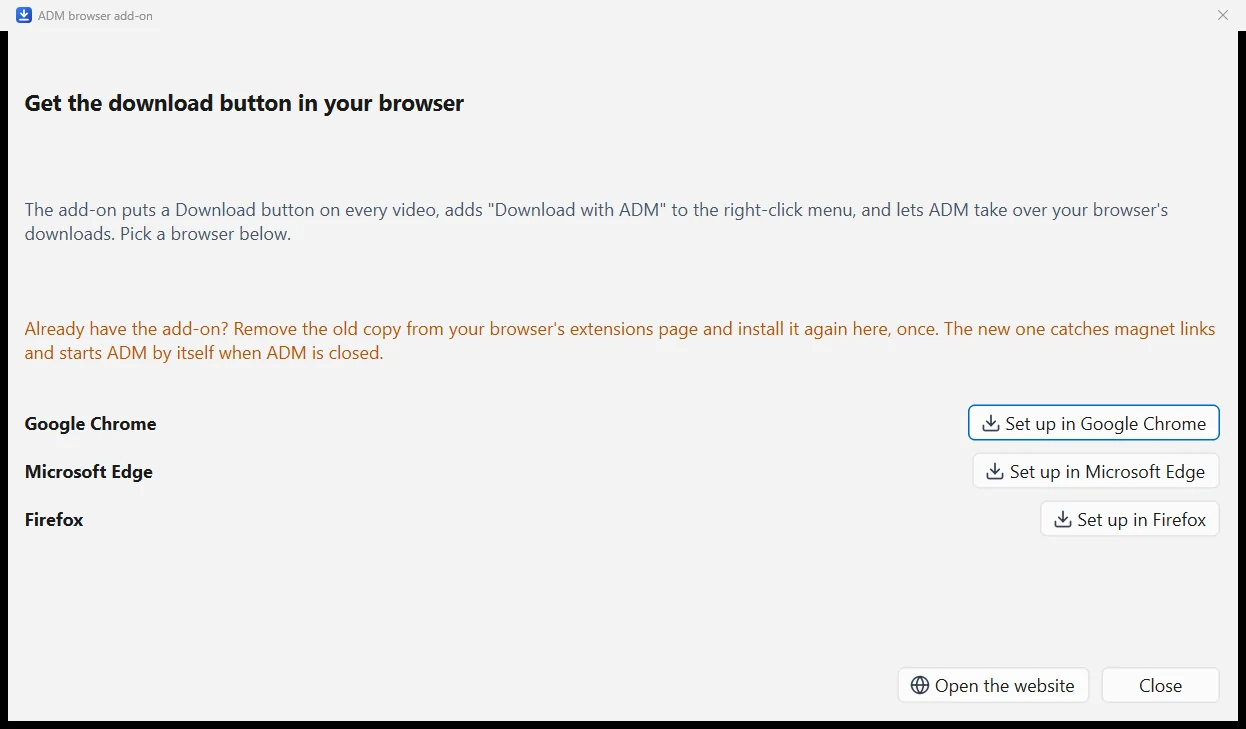
Find it in your application menu under Internet. The first start offers to set up the browser add-on and asks whether ADM should start with your session.
Prefer a terminal? In the folder you downloaded to: sudo apt install ./adm_<version>_amd64.deb. That installs the package and the few libraries it needs in one go.
What is different on Debian
Debian 12 (bookworm) is the oldest release with the libraries ADM needs; Debian 13 and testing work too. Firefox ESR, Debian's default browser, installs the add-on today after you allow unsigned add-ons (about:config, xpinstall.signatures.required set to false), which makes Debian the one .deb distribution where the Firefox add-on works before Mozilla signs it. Chromium from Debian's repository works as well.
On a fresh Debian install, sudo may not be set up for your user. Either install the package as root (su -, then apt install ./adm_<version>_amd64.deb in the download folder), or open the file in GNOME Software or KDE Discover, which ask for the root password themselves.
Debian's GNOME desktop shows no tray icons until you install the AppIndicator extension (apt install gnome-shell-extension-appindicator, then enable it). KDE Plasma, XFCE, MATE and Cinnamon show ADM's tray icon without extra steps. Debian stable does not update ADM through apt; ADM offers its own updates and downloads the new package.
First start and the browser add-on
ADM lists the browsers it found, Chrome, Chromium, Edge, Brave and Firefox, Flatpak builds included, and opens the right page in each one. In Chrome, Chromium and Brave: turn on Developer mode on the extensions page, click Load unpacked and choose the folder ADM opened. In Firefox: Add-ons and themes, the gear icon, Install Add-on From File. After that, every video you hover shows the Download button with its quality list, and the right-click menu gains Download with ADM. Details per browser.
Download a video in 4K
Hover the video in your browser, click the arrow next to Download, pick a quality (up to 2160p60 on YouTube) or Audio only for MP3 and M4A. The file lands in the Videos or Music folder inside Downloads/ADM. The full YouTube guide.
Torrents on Debian
The package recommends the aria2 torrent engine, which apt installs alongside it by default (APT::Install-Recommends is on in a standard Debian install), so magnet links and .torrent files work right away. If ADM reports that the torrent engine is missing, run apt install aria2 as root. More on torrents.
Updates
ADM tells you when a new version is out and downloads the right package, which opens in your software installer and replaces the old version. Video-site fixes come with these updates; Tools, then Check for Updates looks for one right away.
Questions
Which versions of Debian are supported?
Debian 12 (bookworm), Debian 13 and newer. Older releases lack a library the program needs.
Does it work on Debian 11?
No. Debian 11 (bullseye) lacks a library the program needs. Debian 12 or newer is required.
Is there a repository to add?
Not yet. Install the .deb from this site; ADM tells you when a new version is out and downloads it.
Why is there no tray icon on GNOME?
Debian's GNOME hides tray icons until the AppIndicator extension is installed. ADM keeps running without it; use the window, or install the extension.
Where do my downloads go?
In an ADM folder inside Downloads, sorted into Videos, Music, Documents, Programs, Compressed and Images. Choose another place in Options.
Is there an IDM for Debian?
No. Internet Download Manager runs only on Windows. Aynite Download Manager does the same job natively, browser button included. IDM compared.
Read next
- Aynite Download Manager for Linux: Ubuntu, Mint, Debian
- Download Manager for Ubuntu | Aynite Download Manager (ADM)
- Download Manager for Linux Mint | Aynite Download Manager
- Download Manager for Fedora, Arch | Aynite Download Manager
- Download Manager Extension for Chrome, Edge & Firefox | ADM
- Download Manager with Torrent and Magnet Support | ADM