
Aynite Download Manager: a download manager with torrent and magnet link support
HTTP, HTTPS, FTP, SFTP, BitTorrent and magnet links in one queue. Open a magnet link or a .torrent file and Aynite Download Manager (ADM) downloads it alongside everything else: same list, same scheduler, same speed limits. It shows how many people are sharing, and it stops sharing when your download is done unless you want otherwise. Windows and Linux.
Updated 15 October 2026. Applies to Aynite Download Manager 1.7.0.
Open a magnet link or a .torrent file
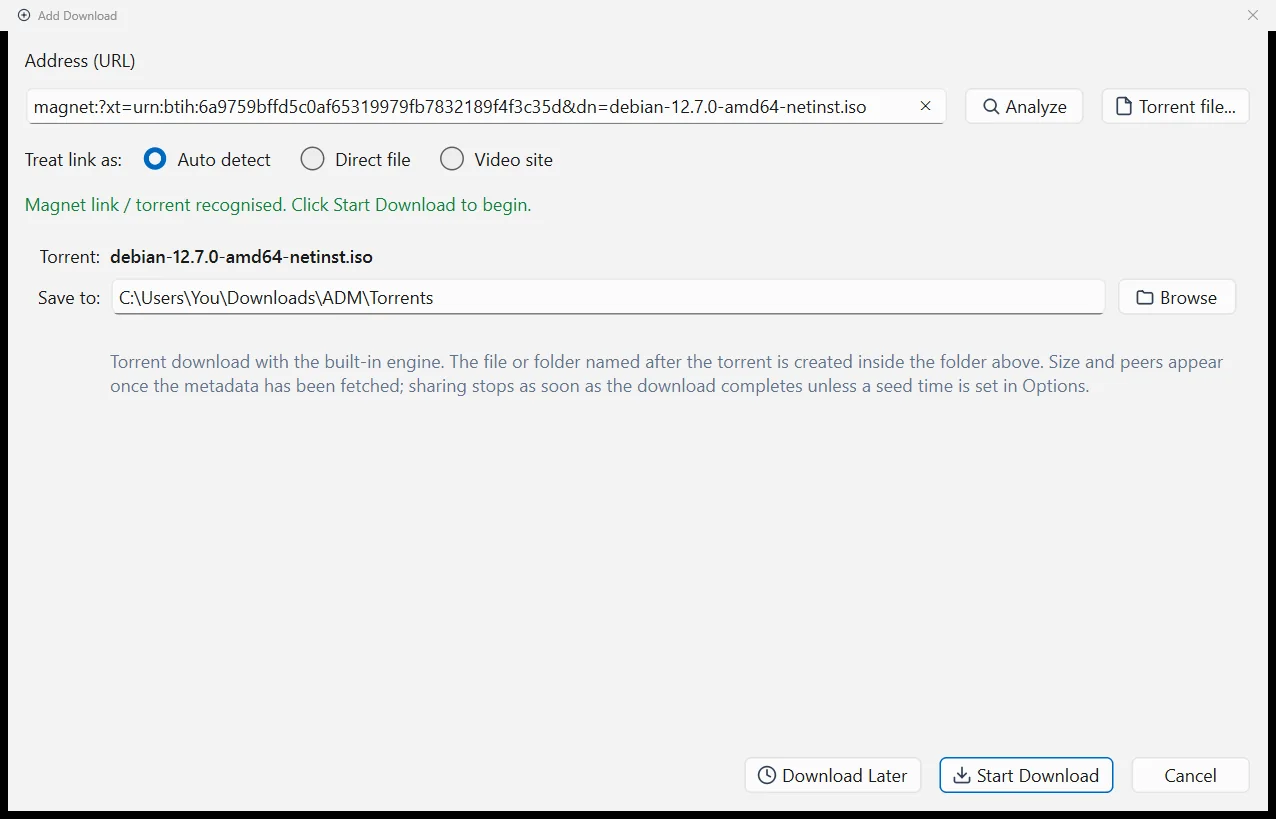
Click a magnet link or a link to a .torrent file in your browser and the torrent starts in ADM straight away, even if ADM was closed. ADM also registers itself for magnet links and .torrent files on Windows and Linux, so a double-click on a .torrent file opens it too. You can also drag a .torrent file onto the window, use Tasks, then Open Torrent File, or paste a magnet link into Add URL.
The torrent lands in the Torrents category and starts like any other download, with its own folder under Downloads\ADM. If you would rather choose a folder each time, turn off the immediate start under Options, Torrents, and the Add window opens first.
Watch seeders and speed
The progress window shows the peers and seeders ADM is connected to, the download speed, the size and the time left, the same as for a normal file. A torrent that nobody is sharing at the moment stays in the list and keeps looking for peers; you can pause it and come back later.
Sharing stops when you say so
By default ADM stops sharing (seeding) as soon as your download is complete. Under Options you can keep sharing for a number of minutes after completion, and set how many peers ADM connects to at once.
Speed limits for torrents and everything else
A torrent can take the whole line. Set a limit for just that download in its progress window, or a limit for all downloads in Options; both apply to torrents as they do to files. The scheduler applies too: queue a large torrent for the night and let ADM shut the PC down when it is done.
Torrents on Linux
The .deb package for Ubuntu, Mint and Debian recommends the aria2 torrent engine, which apt installs with it. With the archive for other distributions, install the aria2 package from your distribution (for example sudo dnf install aria2, or sudo pacman -S aria2) and ADM uses it. ADM for Linux.
How this compares with a separate torrent client
A dedicated torrent client has more knobs: tracker lists, RSS feeds, long-term seeding ratios. ADM covers the common case: get this torrent, as fast as the swarm allows, in the same queue as the ISO you fetch over HTTP and the video you save from a site, with one scheduler and one shut-down-when-done. If you run a seedbox or seed for months, keep your client. If you want torrents without a second program, ADM is enough.
Internet Download Manager does not download torrents at all; the IDM comparison lists the other differences.
Questions
Does Aynite Download Manager support torrents and magnet links?
Yes, both, on Windows and Linux. They sit in the same queue as every other download.
Why is my torrent downloading slowly?
Speed depends on how many people share the torrent and how fast they upload; the progress window shows the seeders. A torrent with few seeders is slow in every program. Also check that no speed limit is set in Options and that the scheduler is not holding the queue.
Does it keep seeding after the download?
Not unless you ask. Options has a setting for how many minutes to keep sharing after a download completes; the default is zero, which stops sharing at once.
Can I schedule torrents overnight?
Yes. Torrents follow the same scheduler as every other download, including the shut down, sleep or hibernate action when the queue finishes.
Is downloading torrents legal?
Torrents are a way of transferring files, used for Linux distributions, games, public-domain video and much else. What matters is the content: download only what you have the right to.
Get ADM
One installer with everything included. Install it, add the browser add-on when asked, and every link you copy or every video you hover is ready to download.
For Windows 10 and 11, Ubuntu, Linux Mint, Debian and other Linux distributions
Verify this file
The Windows installer's fingerprint (SHA-256), for anyone who wants to check the download is untouched:
0b419e24880befe63ef221cf18ad3130dfcaac854884c6de5b13af85854922cb