
How to download a YouTube live stream on PC: record it with Aynite Download Manager, or three other ways
A live stream has no file to download, so ordinary downloaders show nothing. There are four ways to keep one on a PC. Aynite Download Manager (ADM) records it: hover the live video, click Download this video, and ADM saves everything from that moment until the broadcast ends, a timer you set runs out, or you press Stop, as a normal MP4 or MKV. The three alternatives, and when each one fits, are below.
Updated 6 November 2026. Applies to Aynite Download Manager 1.7.0.
Way 1: record it with Aynite Download Manager
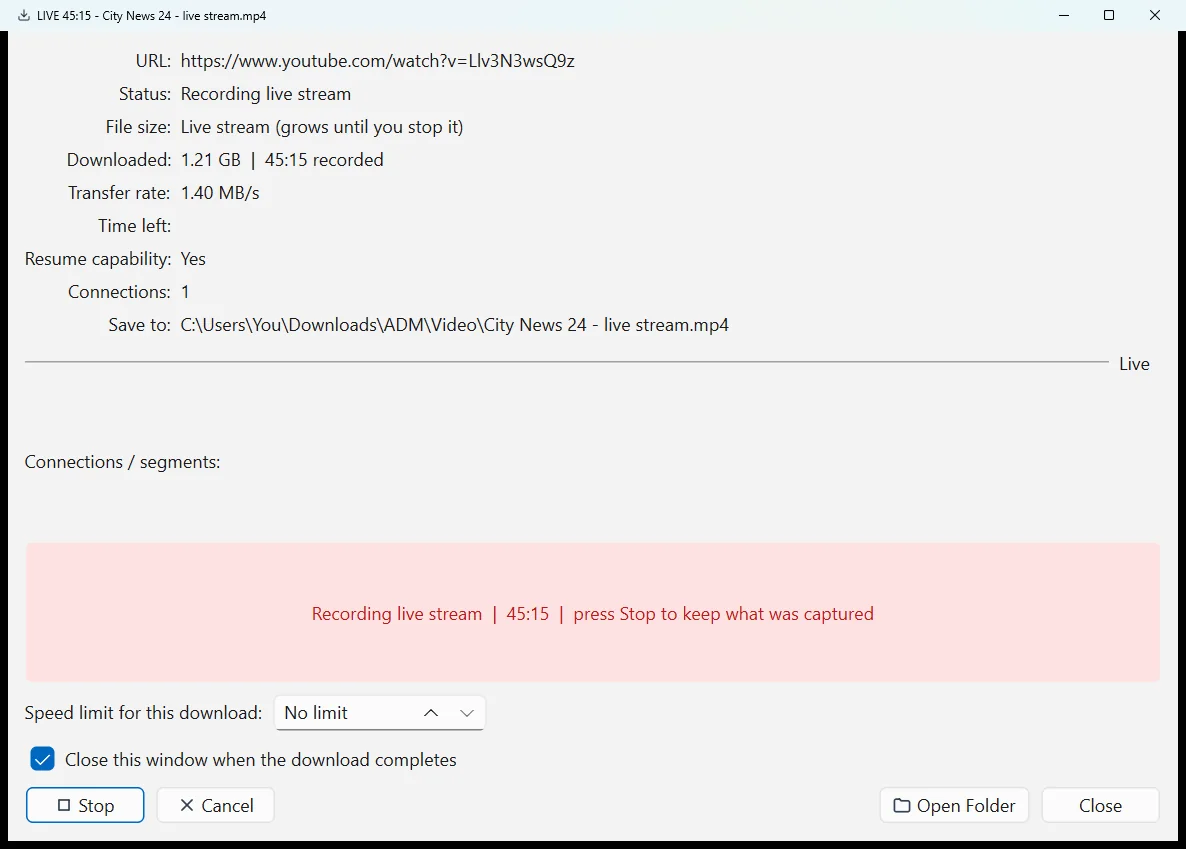
The Download button appears on live videos too, and the quality list shows the live qualities the site offers. Pick one and the progress window switches to recording: it shows LIVE with the time captured so far and the size written. Press Stop whenever you want. The recording is closed properly and turned into an MP4 that plays anywhere. Works on YouTube, Twitch and the other live sites among the 1,800+ supported sites, on Windows and Linux.
To record without staying at the computer, set Stop recording in the Add window: after a length you choose, such as 1 hour 30 minutes, or at a time of day. ADM stops by itself and keeps the file.
Dropped connections are handled for you: ADM reconnects on its own, through outages of up to about twenty minutes, and joins the pieces when you stop. If the broadcast itself ends, the recording ends with it.
Four ways compared
| While it is live | After it ends | Original quality | From the start | Effort | |
|---|---|---|---|---|---|
| Aynite Download Manager | Yes, from the moment you press Download | Yes, if the site keeps a replay | Yes, the stream as sent | Only the replay | One click, press Stop when done |
| YouTube Studio (your own streams) | No | Yes, as the uploader | Yes | Yes | Sign in, find the video, Download |
| Command-line downloaders | Yes, on many sites | Yes | Yes | Sometimes, where the site allows | Install, learn the options, type commands |
| Screen recorder | Yes | No | No, re-encoded from your screen | Only if you start first | Set up the capture region, keep the window visible |
Way 2: YouTube Studio, for your own broadcasts
If the stream is yours, YouTube keeps the recording and lets you download it from YouTube Studio once the broadcast has ended: open Content, find the video, and choose Download from its menu. It is the original quality and it covers the whole stream from the start. It does not help with anyone else's stream.
Way 3: command-line downloaders
Open-source command-line tools can save live streams from many sites and, on some, fetch the part that was broadcast before you started. They are powerful and free, and they are the right choice for people who are comfortable with a terminal. The price is the learning curve: installing the tool and its helper programs, keeping them updated when sites change, and typing the right options for each site.
Way 4: a screen recorder
A screen recorder captures what is on your screen and works on anything that plays, including streams no downloader understands. The result is re-encoded: you get the quality of your monitor and of your CPU's spare time, you cannot use the computer meanwhile, and a notification can land in the middle of the picture. It is the fallback when nothing else works, not the first choice.
What cannot be recorded
Netflix, Prime Video, Disney+ and other subscription services encrypt their streams (DRM) and the browser only decrypts them inside a locked player. No download manager can save those, and the add-on tells you when a video is protected instead of leaving you guessing.
Is recording a live stream allowed?
Record what you have the right to keep: your own broadcasts, streams whose creator allows it, public-domain and openly licensed material, and recordings for personal use where your country's law permits them. Many platforms' terms restrict downloading. ADM does not get around any protection.
Questions
Can I download a YouTube live stream that is already running?
Yes. With Aynite Download Manager the recording starts at the moment you press Download; what was broadcast before that is not included unless the site keeps it as a replay, in which case download the replay afterwards.
Can I download a YouTube live stream from the start?
If it is your own stream, from YouTube Studio once it has ended. For other people's streams, only where the site keeps a replay; ADM then downloads the replay like any video.
How long can a recording be?
As long as the broadcast and your disk allow. ADM writes the recording to disk as it goes; after a crash or a restart of the program the recording picks up again and the parts are joined.
Can a recording stop by itself?
Yes. In the Add window, choose how long to record or the time of day to stop. Without a timer, the recording ends when the broadcast does or when you press Stop.
What format is the recording?
A standard MP4 or MKV, as you choose, in your Videos folder. The picture and sound are saved as the site sends them, not re-encoded, so nothing is lost.
Can I download Twitch streams and VODs?
Yes. A live Twitch stream is recorded the same way, and past broadcasts (VODs) are ordinary videos: the Download button downloads the whole recording in the quality you pick, with no size limit.
Does it work on Linux?
Yes, identically, with the same Stop button and the same file types.
Get ADM
One installer with everything included. Install it, add the browser add-on when asked, and every link you copy or every video you hover is ready to download.
For Windows 10 and 11, Ubuntu, Linux Mint, Debian and other Linux distributions
Verify this file
The Windows installer's fingerprint (SHA-256), for anyone who wants to check the download is untouched:
0b419e24880befe63ef221cf18ad3130dfcaac854884c6de5b13af85854922cb