
Download a video from almost any website with one click in Aynite Download Manager
Aynite Download Manager (ADM) downloads a video from almost any website: hover the video, click Download, pick the quality. It works on YouTube, Vimeo, Dailymotion, Twitter/X, TikTok, Twitch, SoundCloud and over 1,800 other sites, on Windows and Linux. No online converter, no pasting into a web form.
Updated 14 October 2026. Applies to Aynite Download Manager 1.7.0.
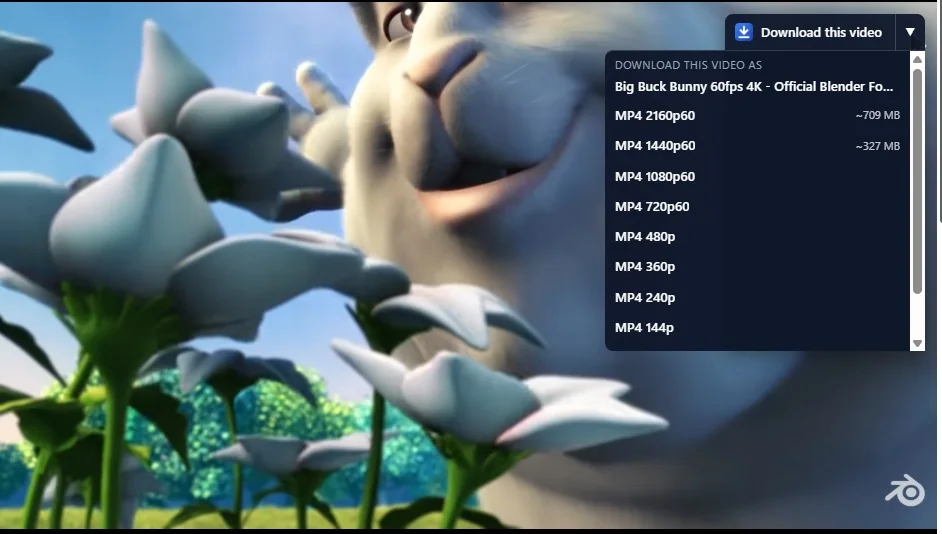
The Download button on the player
With the browser add-on installed, every video you hover shows a Download button. Its arrow opens the list of qualities the site offers for that video, from the largest, often 4K at 60 frames per second on YouTube, down to the smallest, plus audio-only MP3 and M4A. Pick one; ADM downloads the picture and the sound and joins them into one MP4 in your Videos folder.
Sites that work
ADM's video support covers over 1,800 sites: YouTube, Vimeo, Dailymotion, Twitter/X, TikTok, Instagram, Facebook, Twitch, SoundCloud, Reddit, Bilibili, and many news, sports and education sites. Sites change often; the fix comes with the next ADM update, which ADM looks for by itself and installs silently in place (Tools, then Check for Updates checks right away), so a site that broke usually works again once that update is in.
When a site is not on the list, ADM still looks for the media file the page plays and offers it in the Grabber, and it downloads any direct video link, including MP4, WebM and streaming (M3U8) addresses.
Picking quality and MP3
The quality list shows what the site really offers for that video, so a 1080p upload shows 1080p and below; 4K appears only where it exists. Audio only saves MP3 or M4A, for music and talks. The YouTube guide and the MP3 page go into detail.
Pages with several videos
Right-click the page and choose Download all links on this page. The Grabber lists every video, picture and file it found, with filters by type and name; tick what you want and pick one quality for all of them. Playlists and channels work the same way.
What does not work: DRM
Netflix, Prime Video, Disney+ and other subscription services encrypt their videos and the browser only decrypts them inside a locked player. No download manager can save them, and getting around that protection is against the law in most countries, so ADM does not try. The add-on tells you when a video is protected instead of leaving you guessing.
Videos that need a sign-in
Use the Download button on the video while you are signed in to the site, with Send cookies for protected files on in the add-on's popup. ADM uses your sign-in for that download and keeps it on your computer. Pasting the link into ADM without the add-on does not carry the sign-in.
Questions
Why is there no Download button on some videos?
The video is protected (DRM), needs a sign-in, or the page's player hides the video from the add-on. How to tell which, and what to do.
Does it download from Instagram and TikTok?
Yes, from public posts and videos. These sites change their pages often; if one stops working, the fix comes with the next ADM update (Tools, then Check for Updates).
Can I download from a site that is not on the list?
Often yes: ADM finds the media file a page plays and offers it in the Grabber, and it downloads any direct video link.
Does it work on Linux?
Yes, with the same add-on in Chrome, Chromium, Brave and Firefox.
Is downloading videos legal?
Download only what you have the right to save: your own uploads, videos the creator allows you to download, and material released under a licence that permits it. Many platforms' terms restrict downloading.
Get ADM
One installer with everything included. Install it, add the browser add-on when asked, and every link you copy or every video you hover is ready to download.
For Windows 10 and 11, Ubuntu, Linux Mint, Debian and other Linux distributions
Verify this file
The Windows installer's fingerprint (SHA-256), for anyone who wants to check the download is untouched:
0b419e24880befe63ef221cf18ad3130dfcaac854884c6de5b13af85854922cb